
Radiology Information System (RIS): Functions, Workflow & PACS Integration
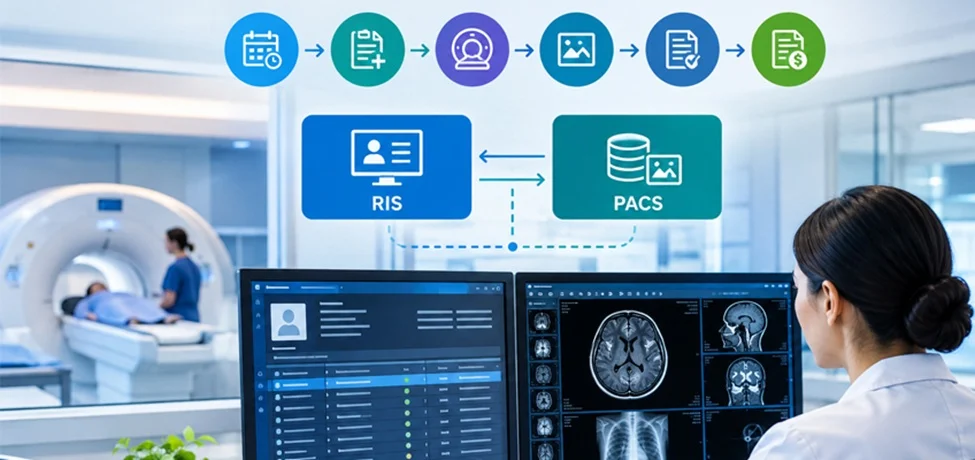
Why does one hospital deliver a scan report by lunchtime while another takes two days? The scanners are often identical. The difference is usually the software running quietly behind them: the radiology information system.
Quick answer: A radiology information system (RIS) is the software that manages everything around a scan, from scheduling and patient registration to reporting and billing. It doesn't store the images. That's the job of PACS, the picture archiving and communication system. Together they run the modern imaging department.
In this guide, we'll keep it simple: what a RIS does, how it differs from PACS, how the two connect, and what a good radiology workflow looks like.
What Is a Radiology Information System?
A radiology information system is a specialized database and workflow tool built for imaging departments. It tracks a patient from the moment an imaging order arrives until the final report is signed and billed.
Think of it as the department's operations brain. The scanner captures the image, but the RIS knows who the patient is, why they're being scanned, which radiologist will read it, and whether the insurer has approved it.
Modern radiology information system software is usually web-based or cloud-hosted, so reporting radiologists, referring doctors and front-desk staff can work from the same live record, whether they're in the hospital, a satellite clinic or at home.
Core Functions of a RIS
What does a radiology information system actually do? These are the jobs that matter most day to day:
- Patient registration and scheduling: books exams, manages modality slots and sends reminders so scanners don't sit idle.
- Order management: receives orders from doctors (often electronically), checks them for completeness and routes them to the right modality.
- Worklist management: sends scheduled exam details to the scanner, so technologists don't retype patient data.
- Radiology reporting: lets radiologists dictate or type reports, use templates, and sign off, with results sent straight back to the referrer.
- Billing and insurance: captures billing codes, handles pre-authorisations and flags claim errors early.
- Tracking and analytics: shows turnaround times, backlog, equipment use and radiologist workload.
- Inventory and quality control: monitors contrast stock, dose records and audit trails.
When these functions live in one system, mistakes drop and patients wait less. That's the whole point of radiology workflow management.
What Is PACS and How Does It Work?
A picture archiving and communication system (PACS) stores, retrieves, displays and shares medical images. If you've wondered how PACS works, it's easier than it sounds:
1. Capture: the scanner (CT, MRI, X-ray, ultrasound) creates the image.
2. Send: the image travels to the PACS server in DICOM, the standard imaging format.
3. Store: the PACS archive saves it with its metadata, such as patient ID, date and modality.
4. View: radiologists open the study on diagnostic-grade viewers and compare it with prior scans.
5. Share: referring doctors and other sites can access the images securely, without CDs or films.
So PACS in radiology replaced film rooms and courier runs with instant digital access. That alone changed how fast patients get answers.
RIS vs PACS: What's the Difference?
The simplest way to remember the difference between RIS and PACS: RIS manages the patient and the process; PACS manages the pictures. Neither replaces the other.
|
RIS |
PACS |
|
|
Main purpose |
Workflow and administration |
Image storage and viewing |
|
Handles |
Orders, scheduling, reports, billing |
DICOM images and viewers |
|
Main users |
Front desk, technologists, billing, radiologists |
Radiologists, referring physicians |
|
Data type |
Text and patient records |
Images and image metadata |
|
Typical question it answers |
"Who is booked, and where is the report?" |
"Where is the scan, and what does it show?" |
One is the filing and planning office. The other is the photo library. A department needs both.
RIS PACS Integration: Why It Matters
RIS PACS integration means the two systems talk to each other automatically, usually through HL7 messages (for patient and order data) and DICOM (for images). When they're connected, the radiologist opens a study and the right patient details, history and order are already there.
What you gain:
- No double data entry, so fewer wrong-patient and wrong-exam errors.
- Faster reading, since the report window and the images open together.
- Report status that updates itself: scheduled, in progress, reported, delivered.
- Cleaner billing, because completed exams trigger charges without manual checks.
Common pitfalls: mismatched patient IDs between systems, vendors using non-standard HL7 fields, and integrations nobody tested under real workload. Ask any vendor to demonstrate the full order-to-report loop live, not on slides.
Some vendors now sell RIS and PACS as one platform. That can simplify support, but check that you can still swap components later.
Radiology Workflow Management: Step by Step
Here is how a well-run workflow looks when the RIS and PACS work together:
1. Order placed: a doctor sends the imaging request, and the RIS logs it.
2. Scheduling: the front desk books a slot, and the patient gets a reminder.
3. Check-in: registration is confirmed, and the exam appears on the modality worklist.
4. Scan: the technologist performs the exam, and images flow to PACS.
5. Reading: the radiologist opens images from PACS alongside the RIS order and priors.
6. Reporting: the report is dictated, verified and signed in the RIS.
7. Delivery: results reach the referring doctor, and critical findings are flagged.
8. Billing: the RIS closes the loop with coding and claims.
If any step is slow, the RIS dashboard shows where the queue is building. That visibility is what good radiology workflow management is really about.
Signs You've Outgrown Your Current Setup
Not sure whether it's time to upgrade? Watch for these red flags:
- Staff re-enter the same patient details in two or three places.
- Reports get delayed because nobody can see which studies are waiting.
- Radiologists open images in one window and hunt for the order in another.
- Billing errors keep sending claims back.
- You can't answer a simple question like "What's our average report turnaround?" without a spreadsheet.
If two or more sound familiar, the problem usually isn't your people. It's a workflow that was never properly connected. A well-chosen RIS, linked to your PACS, tends to fix these quietly, one bottleneck at a time.
A practical tip: before buying anything, map your current workflow on a single page. Mark every point where someone retypes data, waits for a callback or searches for a file. Those marks are your shopping list.
How to Choose Radiology Information System Software
Before you sign anything, run through this checklist:
- Standards support: HL7, DICOM and FHIR compatibility.
- Proven PACS integration: ask for reference sites using your PACS.
- Deployment: cloud, on-premise or hybrid, based on your IT capacity.
- Usability: can a new front-desk hire learn it in days, not weeks?
- Security and compliance: audit trails, role-based access, and local data-protection rules.
- Reporting tools: templates, voice recognition, structured reports.
- Support and scalability: will it handle a second branch or double the volume?
Frequently Asked Questions
What is a radiology information system in simple words?
It's the software that runs the administrative and workflow side of a radiology department: booking, orders, reports and billing.
What is the main difference between RIS and PACS?
RIS manages patient data and workflow. PACS stores and displays medical images.
Can a hospital use PACS without a RIS?
Yes, but staff must manage scheduling, reporting and billing separately, which usually means more manual work and more errors.
What does RIS PACS integration do?
It links patient orders, images and reports so data flows automatically between the two systems.
Is RIS software cloud-based?
Many modern options are, though on-premise and hybrid versions are still common.
What does DICOM have to do with PACS?
DICOM is the standard format and protocol PACS uses to receive and exchange medical images.
Final Thoughts
A radiology information system keeps the department organized, and PACS keeps the images accessible. When both are well integrated, scans move faster, reports go out sooner and staff spend less time on admin.
If you're evaluating options, start with your workflow gaps, not feature lists. Fix the biggest bottleneck first, and the rest follows.
 Media Pack Download
 Newsletters
 Industrial Events