

Laboratory Information System (LIS): How It Works, Why It Matters, and How to Choose One
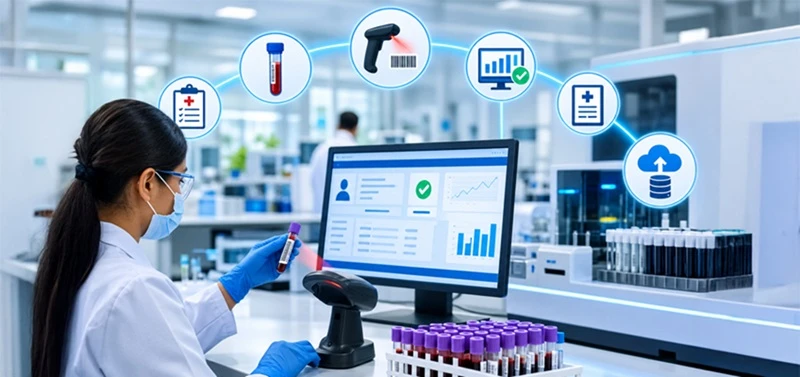
A laboratory information system (LIS) is software that tracks a patient sample from the moment a doctor orders a test to the moment the final report is delivered. It connects to lab machines, records results, flags errors, and keeps everything traceable. This guide explains how an LIS works step by step, how it differs from a LIMS, and what to look for when choosing one.
What Is a Laboratory Information System (LIS)?
In practical terms, a laboratory information system manages the daily operations of a clinical lab. It tracks samples, connects to instruments, records and validates results, and handles billing, quality control, and record keeping.
If a sample passes through your lab, the LIS knows where it is, what has been done to it, and what the result was.
A clinical laboratory information system is built for diagnostic labs, such as pathology, microbiology, and blood testing, where results guide patient care. That is different from research labs, which we’ll compare shortly.
How Does a Laboratory Information System Work?
Here is the laboratory information system workflow, step by step. Most LIS software follows this path.
1. Test ordering
A doctor orders a test through the hospital system, a portal, or a paper requisition. In a modern setup, the order flows straight into the LIS, so no one retypes patient details.
2. Sample collection and labelling
Once the sample is collected, the LIS generates a unique barcode (called an accession number) and prints a label. This single step prevents most mix-ups. The barcode ties the tube to the patient and the test.
3. Sample tracking
As the tube moves from collection to reception to the analyzer, staff scan it at each stage. The LIS logs who handled it and when. If a sample goes missing, you can see its last known location in seconds.
4. Analyzer integration
The LIS connects to lab instruments such as hematology and chemistry analyzers. It sends the test list to the machine, and the machine sends results back automatically. This removes manual entry, one of the biggest sources of lab errors.
5. Result validation
Not every result goes out untouched. The LIS applies rules: it flags values outside normal ranges, catches critical results, and compares them to the patient’s previous results. A technologist or pathologist reviews flagged items before release. Many systems “auto-verify” routine normal results to save time.
6. Reporting
Approved results become a report, delivered through the hospital system, patient portal, email, or print. Critical values can trigger alerts so the doctor is notified quickly.
7. Billing and archiving
The LIS passes test details to billing and stores the full record for audits, compliance, and future reference.
Core Features of Good LIS Software
Not all LIS software is equal, but most solid systems include:
- Sample and specimen tracking with barcode support
- Instrument interfaces for two-way data exchange
- Quality control tools, including Levey-Jennings charts and audit trails
- Reporting and dashboards, such as turnaround time and workload
- Integration with EHR/EMR and billing systems using standards like HL7 and FHIR
- Role-based access and security to protect patient data
- Compliance support for standards such as ISO 15189, CAP, CLIA, or NABL, depending on where you operate
Hospital LIS vs Standalone Clinical LIS
A hospital laboratory information system usually sits inside a wider hospital platform, so lab orders, results, and patient records live in one connected environment. That is great for clinicians, who see everything in one place.
Standalone and independent diagnostic labs often choose a dedicated LIS because they need strong features for outreach, collection centers, home sample pickup, and multi-branch management. Choose based on how you operate, not on which sounds bigger.
LIS vs LIMS: What’s the Difference?
People mix these up all the time. Here is the quick answer.
|
LIS |
LIMS |
|
|
Used in |
Clinical and diagnostic labs |
Research, manufacturing, environmental, and food labs |
|
Focus |
Patient samples and results |
Samples, batches, and experiments |
|
Key outputs |
Patient reports |
Test data, certificates of analysis |
|
Compliance |
CLIA, CAP, ISO 15189 |
GLP, GMP, ISO 17025 |
|
Integration |
EHR/EMR, hospital systems |
ERP, instruments, research tools |
Thumb rule: if your results go into a patient’s medical record, you need an LIS. If you are testing products, batches, or research samples, you need a LIMS. Some labs, such as public health labs, use features of both.
Benefits of a Laboratory Information System
The benefits of a laboratory information system show up quickly in daily work:
1. Fewer errors. Barcodes and automatic result transfer cut down on mislabeling and typing mistakes.
2. Faster turnaround. Auto-verification and instrument connections mean reports reach doctors sooner.
3. Better traceability. Every action is logged, which makes audits far less stressful.
4. Improved patient safety. Critical value alerts and delta checks catch problems early.
5. Less paperwork. Staff spend time on testing, not filing.
6. Smarter decisions. Dashboards show workload peaks, delays, and test volumes so managers can plan.
7. Easier growth. Adding a new collection center or test menu is simpler when everything runs on one system.
Common Challenges When Adopting an LIS
An honest article should mention this part too. Labs often run into:
- Implementation time. Setup, data migration, and instrument interfacing can take weeks to months.
- Staff training. Even great software fails if the team resists it.
- Integration headaches. Older analyzers or hospital systems may need custom interfaces.
- Cost. Licensing, support, and upgrades add up, so ask about the total cost of ownership, not just the first quote.
A good vendor will walk you through these before you sign, not after.
How to Choose the Best Laboratory Information System Software
There is no single “best” for every lab. The best laboratory information system software is the one that fits your size, specialties, and budget. Use this checklist:
- Lab type: Does it support your departments, such as pathology, microbiology, or molecular?
- Integrations: Does it connect with your analyzers, EHR, and billing system?
- Compliance: Does it support the accreditation standards you need?
- Deployment: Cloud-based or on-premise? Cloud is easier to maintain and scale. On-premise gives you more direct control.
- Usability: Ask for a live demo using your own workflow, not a scripted one.
- Support and training: What happens at 2 a.m. when an interface fails?
- Scalability: Will it handle double your volume in three years?
- Pricing: Get licensing, implementation, support, and upgrade costs in writing.
Laboratory Information System Vendors to Know
Here are some well-known laboratory information system vendors in the market. This is a starting point for research, not a ranking, and offerings and ownership change, so verify details with each vendor:
- Epic (Beaker): common in large hospital systems
- Oracle Health: hospital-focused lab and pathology modules
- Clinisys (including Sunquest): widely used in hospital and public health labs
- MEDITECH: integrated hospital platform with lab modules
- Orchard Software: popular with independent and mid-size labs
- Soft Computer (SoftLab): broad clinical lab and blood bank coverage
Shortlist three or four, request demos, and ask each for reference customers similar to your lab.
The Future of LIS
Expect more cloud-based systems, mobile access for reports, AI-assisted result review, and tighter links with digital pathology and patient apps. Labs that modernize now will find those upgrades much easier to adopt.
Frequently Asked Questions
What is a laboratory information system in simple words?
It is software that helps a lab track sample, run tests, record results, and send reports to doctors, all in one place.
What does LIS stand for?
LIS stands for Laboratory Information System.
What is the difference between LIS and LIMS?
An LIS is built for clinical labs that handle patient samples. A LIMS is built for research, industrial, and environmental labs that manage samples, batches, and experiments.
Can an LIS connect to lab machines?
Yes. Most LIS software supports two-way interfaces with analyzers, so test orders go to the machine and results come back automatically.
Is LIS software cloud-based?
It can be either. Many vendors now offer cloud-based LIS, while some labs still prefer on-premise installation.
How much does a laboratory information system cost?
It varies widely by lab size, features, and deployment. Always ask vendors for a full quote that covers setup, training, support, and upgrades.
Who uses an LIS?
Hospital labs, independent diagnostic labs, pathology labs, blood banks, and public health labs.
Final Thoughts
A laboratory information system (LIS) is the backbone of a modern clinical lab. It keeps samples traceable, results accurate, and reports on time. Whether you run a small diagnostic center or a hospital lab, choosing the right system comes down to your workflow, your integrations, and the support behind the software.
 Media Pack Download
 Newsletters
 Industrial Events