

Hospital Information System (HIS): Modules, Types & Benefits

A nurse hunts for a patient's file while the lab waits for a signed order. Billing, meanwhile, has no idea which medicines were actually given. If that sounds familiar, you already know why hospitals invest in a hospital information system.
What Is a Hospital Information System?
A hospital information system (HIS) is an integrated software platform that manages a hospital's clinical, administrative, and financial data in one place. It connects departments like registration, pharmacy, laboratory, billing, and inpatient care, so staff work from the same up-to-date patient record.
You'll also see it called a hospital management information system (HMIS). The two terms are used almost interchangeably. Some vendors use "HMIS" for administrative and operational management and "HIS" for the broader system that includes clinical data, but in practice most buyers treat them as the same thing.
Components of a Hospital Information System
Before the modules, it helps to understand what sits underneath. The main components of a hospital information system are:
- Database: a central, secure repository for patient and operational data.
- Application layer: the modules staff actually use day to day.
- User interface: the screens and dashboards for doctors, nurses, and administrators.
- Integration layer: APIs and standards like HL7 and FHIR that connect the HIS to devices, labs, and other systems.
- Security and access control: role-based permissions, audit trails, and encryption to protect patient data.
- Infrastructure: servers, networks, and cloud or on-premise hosting.
Think of the database as the memory, the modules as the hands, and the integration layer as the nervous system.
Hospital Information System Modules
The hospital information system modules you need depend on your size and specialties, but these are the core ones.
1. Patient Registration and Appointment Scheduling
This is the front door. It captures demographics, assigns a unique patient ID, and manages OPD bookings, walk-ins, and follow-ups. Good scheduling cuts waiting-room chaos noticeably.
2. Electronic Medical Records (EMR/EHR)
The clinical heart of the system. It stores history, diagnoses, prescriptions, vitals, allergies, and notes. Doctors get a complete picture in seconds, not minutes.
3. OPD and IPD Management
OPD handles outpatient consultations. IPD manages admissions, bed allocation, transfers, nursing charts, and discharge summaries.
4. Laboratory Information System (LIS)
Orders go in electronically, samples are tracked, and results flow straight back to the patient record. This reduces lost reports and transcription errors.
5. Radiology Information System (RIS/PACS)
Manages imaging orders, scheduling, reporting, and image storage for X-rays, CTs, and MRIs.
6. Pharmacy and Inventory Management
Tracks prescriptions, dispensing, stock levels, expiry dates, and reorder points. It can also flag drug interactions before they reach the patient.
7. Billing, Insurance, and Revenue Cycle
Automates charge capture, invoicing, TPA and insurance claims, and payment tracking. This is where many hospitals recover revenue that used to leak away.
8. Operation Theatre (OT) Management
Schedules surgeries, allocates surgeons and equipment, and records procedure details.
9. HR, Payroll, and Staff Rostering
Manages shifts, attendance, credentials, and salaries.
10. Analytics and Reporting
Dashboards for bed occupancy, revenue, patient footfall, and clinical outcomes, so decisions rest on data and not gut feeling.
Types of Hospital Information System
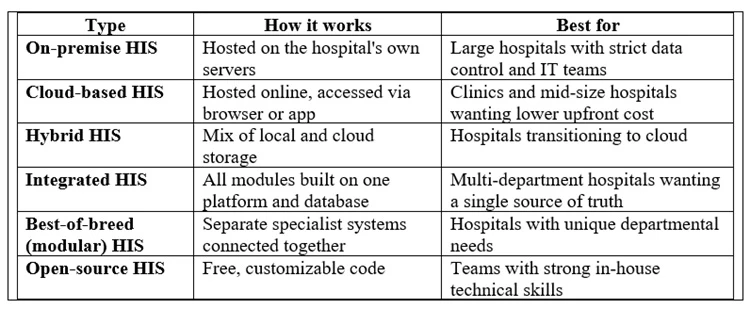
The types of hospital information system can be grouped by how they're deployed and how they're built.
Why an Integrated Hospital Information System Usually Wins
An integrated hospital information system runs every module on one shared database. When a doctor orders a test, the lab sees it, the billing team captures the charge, and the result lands in the patient's record without anyone retyping a thing. Best-of-breed setups can be powerful, but they often mean costly interfaces and data mismatches. For most hospitals, integration saves headaches.
Benefits of Hospital Information System
The real question is what changes on the ground. The main benefits of hospital information system adoption:
1. Fewer errors. Digital prescriptions, barcode-tracked samples, and allergy alerts reduce the mistakes that come from handwriting and manual transfers.
2. Faster patient care. Complete records are available instantly, so doctors spend less time searching and more time treating.
3. Better revenue control. Automated billing catches missed charges and speeds up insurance claims.
4. Lower operating costs. Less paper, less duplication, and better inventory control add up quickly.
5. Stronger data security. Role-based access and audit logs beat a filing cabinet anyone can open.
6. Smarter decisions. Real-time dashboards show where beds are idle, which services earn the most, and where bottlenecks form.
7. Regulatory compliance. Standardized records make audits and accreditation (like NABH or JCI) far less stressful.
8. Happier patients. Shorter queues, accurate bills, and easy access to reports improve the whole experience.
How to Choose the Best Hospital Information System Software
Searching for the best hospital information system software can feel overwhelming, because every vendor claims to be the best. Use this checklist instead:
- Fit your size and specialty. A 30-bed hospital and a 500-bed multispecialty chain need very different systems.
- Check module coverage. Does it include the modules you need today and the ones you'll need in two years?
- Test usability. If doctors and nurses hate the interface, they won't use it. Request a live demo with your own staff.
- Confirm interoperability. Look for HL7 and FHIR support and integration with lab devices and insurance portals.
- Review security and compliance. Ask about encryption, backups, and local data protection regulations.
- Ask about support and training. Implementation fails more often from poor training than from poor software.
- Understand total cost. Include licensing, implementation, customization, training, and annual maintenance.
- Talk to existing customers. References from similar hospitals tell you more than any brochure.
Hospital Information System Vendors to Know
The hospital information system vendors landscape varies by region. Globally recognized names include Epic Systems, Oracle Health (formerly Cerner), and MEDITECH, which are common in large hospital networks. In India and other emerging markets, many hospitals also look at regional and cloud-first vendors that offer lower costs, local billing and insurance workflows, and faster support. Vendor offerings, pricing, and market positions change often, so verify current features and reviews directly before shortlisting.
When comparing vendors, shortlist three, request demos, and score each against the same criteria. This keeps the decision objective.
Common Implementation Mistakes to Avoid
- Skipping staff involvement. Bring clinicians in early.
- Rushing go-live. Run a pilot in one department first.
- Poor data migration. Clean old records before moving them.
- Ignoring training. One workshop isn't enough.
- Choosing on price alone. The cheapest system often costs the most in the long run.
Frequently Asked Questions
What is a hospital information system in simple words?
It's software that keeps all of a hospital's patient, clinical, and financial information in one connected system, so every department sees the same data.
What is the difference between HIS and HMIS?
They're largely the same. HMIS often emphasizes management and administrative functions, while HIS may include deeper clinical features. Many vendors use the terms interchangeably.
What are the main modules of a hospital information system?
Registration, EMR, OPD/IPD, laboratory, radiology, pharmacy, billing, OT management, HR, and analytics.
What is the difference between HIS and EHR?
An EHR focuses on patient clinical records. A HIS is broader and includes the EHR along with billing, inventory, scheduling, and administration.
Is cloud-based HIS safe?
Reputable cloud providers use encryption, access controls, and regular backups, which can match or exceed what a small hospital achieves on its own. Always verify compliance with local regulations.
How long does HIS implementation take?
Small clinics may go live in a few weeks. Large multispecialty hospitals often need several months, depending on customization and data migration.
Final Thoughts
A hospital information system isn't just another IT purchase. It shapes how smoothly your hospital runs, how safe your patients are, and how healthy your finances stay. Start with your real problems, choose an integrated platform that fits your size, involve your staff early, and don't rush implementation.
 Media Pack Download
 Newsletters
 Industrial Events